

Table Contant of MiroMiro Review 2026
What Is MiroMiro?
How Does MiroMiro Work?
MiroMiro Features
- Website Element Inspector
- HTML & Tailwind Export
- Design Token Extraction
- Asset Extraction
- Design System Extraction
- API & MCP Support
MiroMiro Pricing 2026
MiroMiro AppSumo Lifetime Deal
MiroMiro Pros and Cons
MiroMiro vs Chrome DevTools
Who Is MiroMiro Best For?
Is MiroMiro Worth It in 2026?
MiroMiro Review 2026 – Final Verdict
Frequently Asked Questions
If you have ever wanted to inspect a website, copy its design elements, extract its assets, or quickly turn a section into usable code, MiroMiro is a tool worth checking out.
MiroMiro is a Chrome extension designed to help developers, designers, marketers, and creators extract design information and code from live websites. It can inspect website elements, extract colors, fonts, spacing, design tokens, images, SVGs, videos, and Lottie animations, and export selected sections as Tailwind or HTML + CSS.
In this MiroMiro Review 2026, we’ll look at its features, pricing, pros and cons, limitations, and whether the current lifetime deal is worth considering.
Get MiroMiro Review 2026 Lifetime Deal
What Is MiroMiro?
MiroMiro is a browser-based website inspection and design extraction tool.
Instead of manually digging through DevTools or taking screenshots and recreating a design by hand, MiroMiro lets you inspect elements directly on a live website and extract useful design information.
You can use it to:
- Inspect individual website elements
- Extract colors and fonts
- Extract spacing and design tokens
- Download images, SVGs, videos, and Lottie animations
- Export website sections as Tailwind
- Export HTML + CSS
- Extract complete design systems
- Save extracted assets in a library
MiroMiro is particularly useful for frontend developers and designers who need to study or recreate website layouts quickly.
How Does MiroMiro Work?
MiroMiro works through a Chrome extension.
After installing the extension, you can open a website and use its inspection and export features to select an element or section.
The tool reads the actual website’s CSS and page structure rather than simply analyzing a screenshot. This allows you to extract real design values such as colors, typography, spacing, and code.
You can then export the selected content and use it in your development workflow.
According to the current AppSumo listing, MiroMiro’s extraction runs in the browser and does not track browsing data; only anonymous usage counts are stored for plan limits.
MiroMiro Features
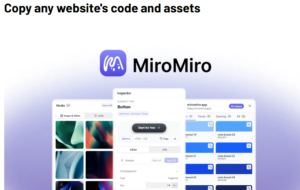
Website Element Inspector
MiroMiro allows you to inspect individual elements on a live website.
This can be useful when you want to understand how a particular button, card, section, or layout is built.
HTML and Tailwind Export
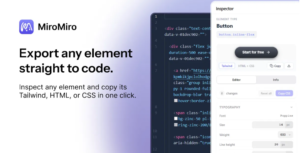
One of MiroMiro’s main features is the ability to export website elements as clean Tailwind or HTML + CSS.
This can save considerable time compared with manually rebuilding a section from scratch.
Design Token Extraction
The tool can extract important design information including:
- Colors
- Fonts
- Typography
- Spacing
- Gradients
- Shadows
- CSS variables
This makes it useful for creating a consistent design system based on an existing website.
Asset Downloads
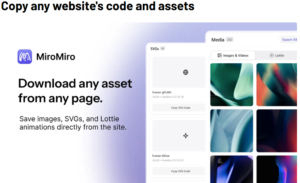
MiroMiro can extract and download supported website assets, including:
- Images
- SVGs
- Fonts
- Videos
- Lottie animations
This is particularly useful when researching a website’s visual assets.
Full Design System Extraction
Instead of inspecting one element at a time, MiroMiro can extract a website’s broader design system.
This can help developers understand the visual language of a website before starting a redesign or prototype.
Saved Items Library
Extracted assets and design information can be saved to a library so you can return to them later.
The amount of storage available depends on the AppSumo tier you purchase.
API and MCP Support
MiroMiro has expanded beyond its Chrome extension with an API and MCP server.
These can allow AI tools and coding assistants to retrieve website design information programmatically.
However, there is an important distinction: the API and MCP server are separate from the AppSumo extension deal.
AppSumo buyers receive free developer access and additional starter credits depending on their tier, but ongoing API usage is handled separately.
MiroMiro Pricing 2026 visit affihub.io
The current AppSumo lifetime deal has three tiers:
Plan Price Users Storage Asset Downloads Tier 1 $49 1 5 GB 2,000/month Tier 2 $109 3 15 GB 2,000/month Tier 3 $249 20 50 GB Unlimited All three tiers include the core MiroMiro features such as element inspection, design token extraction, design system exports, Lottie and SVG exports, and code exports.
The current AppSumo deal is advertised as lifetime access, with future Pro updates included.
The deal also currently comes with a 60-day money-back guarantee through AppSumo.
| Plan | Price | Users Storage | Asset | Downloads |
| Tier 1 | $49 | 1 | 5 GB | 2,000/month |
| Tier 2 | $109 | 3 | 1 5 GB | 2,000/month |
| Tier 3 | $249 | 2 0 | 5 0 GB | Unlimited |
All three tiers include the core MiroMiro features such as element inspection, design token extraction, design system exports, Lottie and SVG exports, and code exports.
The current AppSumo deal is advertised as lifetime access, with future Pro updates included.
The deal also currently comes with a 60-day money-back guarantee through AppSumo.
MiroMiro Pros and Cons
| Pros | Cons |
| Easy website element inspection
|
Primarily designed for Chrome
|
| HTML and Tailwind export
|
API/MCP is separate from the extension deal
|
| Extracts colors, fonts and spacing
|
Storage varies by plan
|
| Downloads multiple asset types
|
Relatively new product
|
| Design system extraction
|
Browser compatibility can be an issue
|
| Lifetime deal available
|
Not a replacement for a full CMS/backend
|
| Useful for AI-assisted development
|
Some advanced workflows require API credits
|
MiroMiro vs DevTools
Chrome DevTools is extremely powerful, but it can be overwhelming for beginners and often requires manually navigating through HTML and CSS.
MiroMiro focuses on making website inspection and extraction more convenient.
With MiroMiro, you can quickly select an element and export useful information instead of manually searching through stylesheets.
However, DevTools remains the better option when you need deep debugging, JavaScript inspection, network analysis, performance testing, or advanced browser debugging.
So, MiroMiro is better viewed as a productivity layer for design and code extraction, rather than a complete replacement for DevTools.
Who Is MiroMiro Best For?
MiroMiro could be a good fit for:
Frontend Developers
Developers can inspect existing website designs and export sections as HTML or Tailwind to speed up prototyping.
Web Designers
Designers can study colors, typography, spacing, and other design elements from live websites.
Freelancers
Freelancers working on multiple website projects may find the asset extraction and design inspection features useful.
AI Developers
The API and MCP functionality can make MiroMiro interesting for developers building AI-assisted website workflows.
Marketers and Researchers
MiroMiro can help analyze the visual structure and assets of websites when researching design patterns.
Is MiroMiro Worth It in 2026?
For developers and designers who regularly inspect websites, MiroMiro can be a useful productivity tool.
The $49 Tier 1 lifetime deal is particularly interesting for solo users because it provides the core functionality, 5 GB of storage, and 2,000 asset downloads per user per month.
Teams may prefer Tier 2 because it provides three licenses and 15 GB of storage.
Tier 3 is aimed more at larger teams or heavy users because it includes 20 licenses, 50 GB of storage, and unlimited asset downloads.
The biggest reason to consider MiroMiro is its combination of design inspection, asset extraction, design-token extraction, and code export in one tool.
Final Verdict
MiroMiro Review 2026 shows that this is a promising website inspection and design extraction tool for developers and designers.
Its biggest advantage is convenience. Instead of switching between multiple browser extensions and manually digging through DevTools, MiroMiro lets you inspect website elements, extract design information, download assets, and export code from one place.
The current AppSumo lifetime deal also makes MiroMiro Review 2026 particularly attractive for developers, designers, and freelancers who expect to use the tool regularly.
However, keep in mind that the API and MCP functionality is separate from the main lifetime extension deal. Browser compatibility should also be considered before purchasing.
Overall Rating: 4.3/5
Best for: Frontend developers, web designers, freelancers, and AI-assisted development workflows.
Verdict: If you frequently analyze or recreate website designs, MiroMiro Review 2026 is worth considering.
Frequently Asked Questions
Is MiroMiro worth it?
MiroMiro can be worth it for developers and designers who frequently inspect websites, extract design systems, download assets, or export frontend code.
Does MiroMiro work on mobile?
MiroMiro is designed as a Chrome extension, so its primary use case is desktop Chrome rather than mobile browsers.
Does MiroMiro copy an entire website?
MiroMiro can extract website sections and full-page frontend code, but it does not recreate the backend, database, CMS, or complete functionality of a web application.
Does MiroMiro include API access?
The API and MCP server are separate from the AppSumo extension deal. AppSumo buyers receive free developer access and additional starter credits based on their purchased tier.
How much does MiroMiro cost?
The current AppSumo lifetime options are $49 for Tier 1, $109 for Tier 2, and $249 for Tier 3.
Is MiroMiro better than Chrome DevTools?
MiroMiro is easier for quickly extracting design information and frontend code, while Chrome DevTools is more powerful for advanced debugging and development tasks. They serve different purposes.
Does MiroMiro track browsing data?
According to the current AppSumo listing, MiroMiro’s extraction runs entirely in the browser and it does not track browsing data. Anonymous usage counts are stored for plan limits.
Can MiroMiro work with AI tools?
Yes. Its API and MCP server can connect website design extraction workflows with AI and coding tools such as ChatGPT, Claude, and Cursor, although API/MCP usage is separate from the core extension deal.
More Appsumo Deal visit affihub.io