









Overview of AI Toolbox Review 2026
AI Toolbox Review 2026 explores how AI Toolbox helps users organize AI conversations, manage prompts, search chat history, and export useful information from supported AI platforms. Designed for productivity, AI Toolbox can be useful for bloggers, students, developers, freelancers, and professionals who regularly use multiple AI assistants. In this review, we examine its key features, pricing plans, pros and cons, privacy considerations, and overall value to help you decide whether AI Toolbox is worth using in 2026.
Get AI Toolbox Review 2026 Lifetime Deal
What Is AI Toolbox?
In this AI Toolbox Review 2026, AI Toolbox is a productivity-focused browser extension designed to help users organize AI conversations, manage prompts, search chat history, and export useful content. It aims to simplify workflows for people who regularly use AI platforms such as ChatGPT, Google Gemini, Claude, and Grok. Instead of replacing these AI assistants, AI Toolbox adds organizational features that make conversations easier to manage. It can be useful for bloggers, students, developers, freelancers, and professionals who want to save time and improve productivity while working with multiple AI tools.
Key Features of AI Toolbox
-
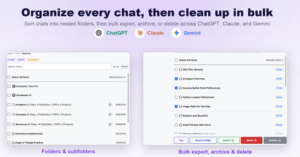
AI Chat Organization
One of the main challenges of using AI regularly is keeping track of previous conversations. AI Toolbox helps users organize chats into folders, making it easier to find information related to specific projects.
For example, you can create separate folders for blogging, programming, marketing, education, and business research.
-
Search Across Conversations
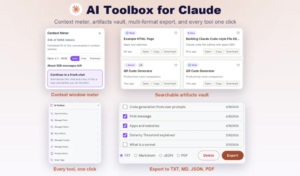
Finding an old answer can take time when you have hundreds of conversations. AI Toolbox offers chat-search functionality to help users locate relevant information more quickly.
This feature can be especially useful for bloggers, researchers, students, and professionals who frequently use AI tools.
-
Chat Export Options
AI Toolbox provides conversation-export features, with available formats depending on the subscription plan. These may include TXT, PDF, Markdown, and JSON.
Exporting conversations can help users save useful information, maintain personal records, and reuse research in future projects.
-
Prompt Library
The prompt-management functionality allows users to save frequently used instructions and reuse them when needed.
Bloggers can save prompts for SEO outlines, article introductions, keyword research, and content editing. Developers can also maintain reusable prompts for coding tasks.
-
Support for Multiple AI Platforms
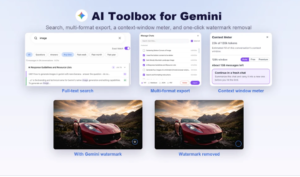
Users who work with several AI assistants may benefit from having a consistent way to organize their conversations.
However, the exact features and level of support can vary by platform. Check the official website for the latest compatibility details.
AI Toolbox Pricing in 2026 Visit affihub.io
License Overview
- Tier: License Tier 1
- Price: $59 (Lifetime access)
Features & Limits
Feature / Detail |
Limit / Access Level |
| Library with 1,000+ expert prompts | Unlimited |
| Custom saved prompts with {{variable}} placeholders | Unlimited |
| Prompt chaining (multi-step workflows) | Unlimited |
| Folders and subfolders | Unlimited |
| Pinning | Unlimited |
| Bulk export | Unlimited |
| Bulk delete | Unlimited |
| Bulk archive | Unlimited |
| Message bookmarks | Unlimited |
| Labels dashboard | Unlimited |
| Media gallery | Unlimited |
| Full-text search | Included |
| Conversation auto-categorization | Included |
| All export formats | Included |
| Sync across all devices/browsers | Included |
| Automatic watermark removal | Included |
| 4 toolboxes in 1 unified license | Included |
| Conversation export | Included |
| Cross-device sync | Included |
Pros and Cons of AI Toolbox
Pros
- Helps organize AI conversations.
- Makes finding previous information easier.
- Provides reusable prompt-management features.
- Supports exporting conversations in supported formats.
- Offers a free option for trying its basic functionality.
- Can be useful for people who work with multiple AI platforms.
Cons
- Advanced features may require a paid subscription.
- It does not replace the underlying AI services.
- Browser compatibility may be limited.
- Features may differ between supported AI platforms.
- Privacy and data-handling practices require careful review.
- It may be unnecessary for people who use only one AI assistant occasionally.
Is AI Toolbox Safe to Use?
Privacy is an important consideration when installing any browser extension that interacts with AI conversations.
Before installing AI Toolbox, review its privacy policy, Chrome Web Store permissions, data collection practices, and account requirements.
Avoid using any extension with sensitive personal information until you understand how it handles conversation content and whether any data is transmitted to external servers.
Businesses and professionals should also check their organization’s security policies before installing third-party extensions.
No browser extension should be considered completely safe without an appropriate assessment of its permissions and data practices.
Who Should Use AI Toolbox?
AI Toolbox may be useful for several types of users.
Bloggers and content creators: Organize research, writing prompts, and previous content ideas.
Students: Keep study-related AI conversations organized for easier reference.
Developers: Manage conversations about coding, debugging, and technical research.
Freelancers: Separate AI-assisted work by client or project.
Researchers: Find previous discussions and export useful information.
On the other hand, casual users who ask only a few questions each week may not need an additional extension.
AI Toolbox vs. Using ChatGPT Normally
The main difference is the purpose of each tool.
ChatGPT is an AI assistant that generates answers, helps with writing, and supports problem-solving. AI Toolbox focuses on organizing and managing AI conversations through additional productivity features.
If your primary goal is generating content or answering questions, a standalone AI assistant may be sufficient. If you regularly use several AI platforms and need better conversation management, AI Toolbox may provide additional value.
Is AI Toolbox Worth It in 2026?
AI Toolbox may be worth trying if you frequently use multiple AI assistants and struggle to manage your conversation history.
Its organizational features, search functionality, and prompt library can help streamline everyday workflows.
However, the value of a paid subscription depends on how often you use these features. Start with the free plan, test it with your normal workflow, and upgrade only if the premium features provide clear benefits.
Users who prioritize privacy should carefully review the extension’s current policies and permissions before connecting it to their AI accounts.
Final Verdict
In this AI Toolbox Review 2026, AI Toolbox stands out as a productivity extension that helps users organize and manage AI conversations without replacing their existing AI assistants. Its key benefits include chat organization, conversation search, prompt management, and content export. However, some advanced features may require a paid subscription, compatibility can vary across AI platforms, and users should review its privacy policies before installation.
Our recommendation: Try the free version first. If it saves you time and fits your workflow, consider upgrading after checking the latest pricing and subscription terms.
Frequently Asked Questions
-
What is AI Toolbox used for?
AI Toolbox helps users organize AI conversations, search chat history, manage prompts, and export supported content.
-
Is AI Toolbox free?
A free plan has been offered, although some features require a paid subscription. Check the official website for current terms.
-
Does AI Toolbox generate AI content?
Its primary purpose is managing AI conversations and productivity. Content generation depends on the underlying AI platform you use.
-
Does AI Toolbox work with ChatGPT?
It has been designed to support ChatGPT alongside other AI platforms. Check its current compatibility details before installing it.
-
Is AI Toolbox worth buying?
It may be worthwhile for frequent AI users who need advanced organization and search features. Casual users should consider starting with the free plan.
-
Where can I download AI Toolbox?
More Appsumo Deal Visit affihub.io