









Megamendung Suite Review 2026: Overview
Megamendung Suite Review 2026 explores an AI-powered accounting tool designed to make bookkeeping easier for freelancers, small businesses, and online entrepreneurs. The software aims to reduce manual work by helping users create journal entries, scan receipts, organize financial records, and generate accounting reports.
One of its main features is the AI Journal Copilot, which lets users describe a business transaction in simple language and generates a proposed accounting entry. It also offers AI-powered receipt scanning, chart-of-accounts creation, recurring journal entries, and Stripe integration for supported transactions.
Megamendung Suite is available through AppSumo, where its lifetime deal has been advertised from $49. However, some AI features require higher-tier plans and your own AI API key.
Overall, Megamendung Suite could be a useful option for businesses looking to simplify everyday bookkeeping with AI. However, since it is a relatively new product, buyers should check its current features, pricing, reliability, and tax-compliance capabilities before purchasing. Indian businesses should pay particular attention to GST requirements.
Get Megamendung Suite Review 2026 appsumo Lifetime deal
What Is Megamendung Suite?
In this Megamendung Suite Review 2026, Megamendung Suite is an AI-powered accounting tool that helps freelancers and small businesses simplify bookkeeping. It offers AI-generated journal entries, receipt scanning, financial reports, and Stripe integration. Available through AppSumo, it aims to reduce manual accounting work and save time. However, users should verify its features, pricing, and tax compliance before purchasing.
You can explore the product on its find its https://affihub.io/
Best for:
- Freelancers
- small businesses
- people who handle routine bookkeeping.
Key Features of Megamendung Suite

-
AI Journal Copilot
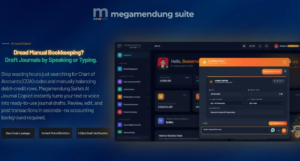
One of the more interesting features is the AI Journal Copilot. Users can describe a business transaction in everyday language, and the software prepares a proposed journal entry with appropriate debit and credit accounts.
For example, a business owner might enter a transaction describing an electricity bill paid from the company bank account. The AI can use that information to prepare the corresponding accounting entry.
This could save time for businesses that process similar transactions regularly. However, AI-generated entries should still be reviewed before posting, especially when a transaction involves unusual tax treatment or complex accounting rules.
-
AI Receipt Scanning and OCR
Manually entering information from receipts and invoices is tedious, particularly when a business handles dozens or hundreds of documents each month.
Megamendung Suite uses Gemini-powered OCR to extract information such as the supplier name, transaction date, amounts and tax details from uploaded receipts or PDFs. The extracted information can then populate a journal-entry form.
The benefit is straightforward: less typing and fewer repetitive data-entry steps.
The important caveat is that OCR quality depends on the document. Blurry photographs, unusual invoice layouts and handwritten information may require corrections. Users should compare extracted amounts and tax figures against the original documents.
-
AI Chart of Accounts Builder

Setting up accounting software can be difficult for someone unfamiliar with bookkeeping terminology.
Megamendung Suite offers an AI-based chart of accounts generator. You describe your business, and the tool proposes a structure of accounts suited to its activities.
For example, an online store may need accounts for sales revenue, inventory, payment-processing fees, shipping expenses and refunds. A consulting business would have a different set of requirements.
The generated structure can be reviewed and edited before it is saved.
This feature may make initial setup easier, but an automatically generated chart of accounts is not a substitute for professional accounting advice when a business has complex reporting requirements.
-
AI Financial Report Builder
The software can help users organize accounting data into financial reports, including:
- Profit and loss statements
- Balance sheets
- Cash flow statements
- General ledger reports
- Trial balances
Its AI report builder helps map accounts into report categories, while the platform’s reporting features can produce PDF exports.
For a small business owner who regularly prepares financial summaries for management or investors, this could reduce spreadsheet work.
However, a professional-looking report is only as reliable as the underlying bookkeeping. Incorrect account mappings or incomplete transactions can still produce misleading results.
-
Stripe Integration
For online businesses that receive payments through Stripe, reconciliation can become time-consuming. Sales, refunds, payment-processing fees and payouts do not always appear as identical amounts in the bank account.
Megamendung Suite advertises Stripe synchronization that brings supported payment activity into its accounting workflow.
This can be useful for SaaS companies, online stores and service providers that rely on Stripe.
Before purchasing, check the precise integration workflow, supported transaction types and how it handles refunds, fees, payout clearing and reconciliation with your actual bank records.
-
Recurring Journal Entries
Businesses often record the same types of transactions every month, including rent, subscriptions and certain scheduled expenses.
Megamendung Suite includes a recurring journal scheduler that can prepare or post transactions according to configured schedules.
This feature may reduce repetitive work and help keep monthly books up to date. Nevertheless, recurring entries should be checked whenever amounts, contracts or accounting treatment change.
-
Tax Handling and Accounting Standards
The product advertises support for cash and accrual accounting, configurable tax rules, and accounting workflows aligned with GAAP and IFRS.
It also describes support for VAT, GST and other tax configurations.
These capabilities may be useful for businesses operating across different markets. However, support for a tax label such as GST does not automatically establish compliance with every country’s tax rules, filing formats or reporting obligations.
Indian businesses should verify GST return support, invoice requirements, input tax credit treatment, e-invoicing and integration with their existing accounting workflow before relying on the software for compliance.
Megamendung Suite Pricing in 2026
The AppSumo listing currently advertises a lifetime deal rather than a conventional monthly subscription.
Here is the comparison table based on the screenshot provided:
Feature / Plan |
1 Code PNG |
2 Codes PNG |
3 Codes PNG |
| Price | $49 (Lifetime access) | $98 (Lifetime access) | $147 (Lifetime access) |
| Branches / Locations | 1 | 3 | 5 |
| User Seats | 3 | 9 | 15 |
| OCR Scans | No | Unlimited (BYOK) | Unlimited (BYOK) |
| AI COA Builder | 3x Built-in one time | Unlimited (BYOK) | Unlimited (BYOK) |
| AI Report Builder | 6x Built-in one time | Unlimited | Unlimited |
Pricing and limits are based on the published AppSumo listing checked in October 2026. Confirm the current offer and complete terms before buying.
There is an important detail here: the lowest-priced plan has restrictions on some AI features, including receipt OCR and the AI Journal Copilot. Higher tiers advertise additional capabilities, with some AI functions using a bring-your-own-key (BYOK) model.
BYOK means you provide your own supported AI API key rather than relying entirely on AI usage bundled into the software. Depending on your usage and provider, this can involve separate costs and setup.
A lifetime deal also does not guarantee that every future AI service or external integration will remain free forever. Read the terms carefully before making a long-term decision.
Here is a structured breakdown comparing the AppSumo LTD deal (Megamendung Suite) against mainstream cloud accounting platforms (QuickBooks, Xero, and Zoho Books):
QuickBooks Online is used for the following tasks:
- Accounting and Bookkeeping
- Invoice Creation
- Income and Expense Tracking
- Tax Preparation
- Financial Reporting
- Bank Reconciliation
- Payroll Management
- Accounts Payable and Receivable
- Inventory Management
- Freelance Bookkeeping
Official Website: QuickBooks Online
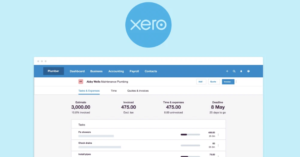
Xero is used for the following tasks:
- Accounting and Bookkeeping
- Invoice Creation
- Income and Expense Tracking
- Tax Management
- Financial Reporting
- Bank Reconciliation
- Payroll Management
- Inventory Management
- Accounts Payable and Receivable
- Freelance Bookkeeping
Official Website:Xero
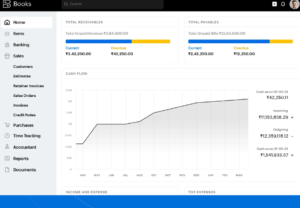
Zoho Books is used for the following tasks:
- Accounting and Bookkeeping
- Invoice Creation
- Income and Expense Tracking
- GST and Tax Management
- Financial Reporting
- Bank Reconciliation
- Inventory Management
- Accounts Payable and Receivable
- Business Expense Management
- Freelance Bookkeeping
Official Website:Zoho Books
Feature & Pricing Comparison Table
| Feature / Metric | AppSumo Deal (Megamendung) PNG | QuickBooks Online | Xero | Zoho Books |
| Pricing Model | One-time payment ($49–$147 lifetime) | Monthly subscription ($30–$200+/mo) | Monthly subscription ($15–$78+/mo) | Monthly sub (Free tier available, $15–$240/mo) |
| Best For | Freelancers, small businesses & AppSumo LTD lovers | Growing SMBs requiring industry-standard reporting | Mid-sized businesses & collaboration with bookkeepers | Micro-to-small businesses needing deep app integrations |
| AI Features | AI COA & AI Report Builder built-in | Custom AI assist & categorized transactions | AI-powered bank reconciliation | Auto-scan receipts & smart workflows |
| OCR Receipt Scanning | Included (Unlimited via BYOK on 2+ codes) | Available in higher tiers / add-ons | Built-in via Hubdoc integration | Included in standard/higher plans |
| Multi-Location Support | Up to 5 branches (3 Codes tier) | Requires Plus/Advanced tiers | Supported via tracking categories | Supported on Professional tiers |
| Bank Feeds & Integrations | Limited direct integrations | Native sync with 10,000+ banks & app ecosystem | Native sync with major global banks | Deep native integration with Zoho ecosystem |
Key Takeaways & Recommendation
- Choose the AppSumo Deal (Megamendung Suite) if you want zero monthly subscription fees, need built-in AI assistant tools for Chart of Accounts (COA) generation, and manage standard bookkeeping across 1 to 5 locations.
- Choose QuickBooks Online if your accountant or tax professional requires standard QuickBooks file access or if you need robust inventory management.
- Choose Xero if you want unlimited user access across all tiers and clean bank reconciliation workflows.
- Choose Zoho Books if you already use other Zoho applications (CRM, Projects, Desk) or want a strong free-to-low-cost subscription path.
Zoho Books pricing varies by region (India INR rates vs. Global USD rates).
Below is the full pricing breakdown across all plans:
Zoho Books pricing varies by region (India INR rates vs. Global USD rates).
Below is the full pricing breakdown across all plans:
-
India Pricing (INR)
All prices exclude 18% GST. Billed per organization.
Plan |
Billed Annually |
Billed Monthly |
Users Included |
Key Features |
| Free | ₹0 | ₹0 | 1 + 1 Accountant | Annual turnover < ₹25 Lakh, up to 1,000 invoices/year, 1 GSTIN. |
| Standard | ₹749 / mo | ₹899 / mo | 3 Users | Recurring invoices, automated bank feeds, e-Invoicing & e-Way bills. |
| Professional | ₹1,499 / mo | ₹1,799 / mo | 5 Users | Inventory tracking, purchase orders, 2 GSTINs, multi-currency. |
| Premium | ₹2,499 / mo | ₹2,999 / mo | 10 Users | Budgeting, approval workflows, custom portals, 3 GSTINs. |
| Elite | ₹4,999 / mo | ₹5,999 / mo | 15 Users | Advanced inventory control, warehouse management, batch/serial tracking. |
| Ultimate | ₹8,332 / mo | ₹9,999 / mo | 15 Users | Advanced analytics via Zoho Analytics, custom KPI dashboards. |
- Extra Users: ₹150/user/month (annual billing) or ₹180/user/month (monthly billing).
-
Global / USD Pricing
For US and international customers. Prices exclude local sales taxes.
| Plan | Billed Annually | Billed Monthly | Users Included | Key Features |
| Free | $0 | $0 | 1 + 1 Accountant | Revenue < $50k USD/year, 1,000 invoices & bills/year. |
| Standard | $15 / mo | $20 / mo | 3 Users | Up to 5,000 invoices/year, recurring expenses, custom fields. |
| Professional | $40 / mo | $50 / mo | 5 Users | Project profitability, purchase orders, inventory, multi-currency. |
| Premium | $60 / mo | $70 / mo | 10 Users | Budgeting tools, custom domain, higher transaction caps. |
| Elite | $120 / mo | $150 / mo | 10 Users | 100,000 invoices/year, advanced inventory control. |
| Ultimate | $240 / mo | $275 / mo | 15 Users | Business intelligence analytics, highest volume limits. |
- Extra Users: $2.50/user/month (annual billing) or $3/user/month (monthly billing).
Pros and Cons
Pros
- AI-assisted bookkeeping: Natural-language journal drafts can reduce repetitive data entry.
- Receipt extraction: OCR can transfer invoice and receipt information into accounting forms.
- Financial reporting: The software supports common financial statements and report exports.
- Stripe synchronization: Useful for businesses with supported Stripe-based payment workflows.
- Recurring entries: Helps automate routine accounting tasks.
- Lifetime pricing: The AppSumo offer may appeal to buyers who prefer a one-time software payment.
Cons
- Very new product: The AppSumo listing identifies it as an early-stage Radar product.
- No established review history: The listing showed no customer reviews when checked.
- Plan restrictions: Some advertised AI features are not included in the entry-level plan.
- BYOK setup: Certain AI functions may require users to configure their own AI API access.
- Compliance needs verification: Local tax requirements may not be fully covered by general accounting-standard support.
- Limited independent evidence: The advertised features and security claims should be validated through testing and documentation rather than assumed to be independently verified.
The biggest concern is not necessarily the feature list. It is the maturity of the product and the lack of an established track record. Accounting software stores important financial records, so reliability, support quality, data export and recovery procedures matter as much as AI automation.
Is Megamendung Suite Suitable for Indian Businesses?
For Indian users, this is an important question.
The product advertises configurable GST support, but businesses should not assume that this means complete Indian accounting and statutory compliance.
Before using it for live accounts, check whether it supports the specific workflows you need:
- GST-compliant sales and purchase invoices
- CGST, SGST and IGST treatment
- GSTR-1 and GSTR-3B reporting
- Input tax credit reconciliation
- Indian bank statement imports and reconciliation
- Tally data migration and practical accountant workflows
- Required invoice numbering, audit records and exports
If you run a small online business and primarily need transaction organization, financial summaries and Stripe bookkeeping, Megamendung Suite may be worth testing.
If your business depends on Indian GST filings, inventory accounting, payroll or established workflows with a chartered accountant, verify those requirements before switching from your existing accounting system.
Is Megamendung Suite Safe and Reliable?
The company describes features such as encryption, tenant-level data separation and audit logging on its website. These are useful security claims, but they should not be treated as independent certification or proof that the platform has been comprehensively audited.
Before uploading real financial records, I would recommend:
- Test the platform with sample transactions and non-sensitive documents.
- Verify that exports contain all the records you need.
- Check how backups, account recovery and data deletion work.
- Confirm who can access your records and how team permissions operate.
- Test AI-generated journal entries against known accounting examples.
- Contact support with a practical question and assess the response.
For a new accounting platform, these checks are especially important because financial data can be difficult to reconstruct if a migration or service failure goes wrong.
Final Verdict: Should You Buy Megamendung Suite in 2026?
Megamendung Suite is an interesting AI accounting product for businesses that want to reduce manual journal entry, scan receipts, automate supported Stripe bookkeeping and generate financial reports.
Its lifetime deal is attractive on price, particularly for freelancers and small businesses willing to work with an early-stage product.
However, the absence of established customer reviews means there is not yet enough independent evidence to confidently recommend it as a replacement for a mature accounting system. Feature claims, security assurances and accounting compliance should be tested rather than accepted at face value.
My recommendation: Consider Megamendung Suite if you want to experiment with AI-assisted bookkeeping and can validate the results before relying on them. For business-critical accounts, test the complete workflow, verify data portability and confirm local compliance requirements before migrating your books.
Overall assessment: Promising concept, potentially good lifetime-deal value, but still a product to evaluate carefully rather than an unquestionable accounting-software winner.
Editorial note: This review is based on publicly available product and deal information as of October 2026. It is not a hands-on test or a verified customer testimonial. Features, plan limits and pricing may change.
Frequently Asked Questions
Is Megamendung Suite free?
The product website advertises a free trial. AppSumo also lists a paid lifetime deal. Check the current terms to confirm which features are available in each option.
Does Megamendung Suite use AI?
Yes. The advertised AI features include natural-language journal preparation, receipt OCR, chart-of-accounts generation and financial report mapping.
Does it support Stripe?
Yes. The AppSumo listing advertises Stripe integration for supported sales, refunds, fees and payout workflows.
Is Megamendung Suite good for beginners?
Its plain-language setup and journal-drafting features may make bookkeeping more approachable. Beginners should still review AI-generated entries and understand the basic accounting treatment of their transactions.
Is Megamendung Suite suitable for GST accounting in India?
It advertises configurable GST support, but Indian businesses should verify the exact statutory reporting and filing requirements before relying on it for compliance.
Does Megamendung Suite have customer reviews?
The AppSumo listing showed no customer reviews when checked in October 2026. That makes it difficult to assess real-world reliability, support quality and long-term performance.