

GSpeech Review 2026 looks at how this WordPress text-to-speech plugin can turn written website content into natural-sounding audio. It offers multiple AI voices, multilingual support, voice customization, pronunciation controls, and WooCommerce compatibility. GSpeech is particularly useful for bloggers, publishers, online stores, and accessibility-focused websites that want to give visitors an easy way to listen to content instead of reading it. In this review, we’ll cover its key features, pricing, benefits, limitations, and overall value to help you decide whether GSpeech is the right text-to-speech solution for your WordPress website.
Get GSpeech Review 2026 Lifetime Deal
What Is GSpeech?
GSpeech is a text-to-speech platform and WordPress plugin that converts written website content into natural-sounding audio. It allows visitors to listen to blog posts, articles, and other text instead of reading everything on the screen.
With support for multiple languages and a wide range of voices, GSpeech can make websites more accessible and convenient for users who prefer audio content. It can be especially useful for bloggers, publishers, businesses, and WordPress website owners who want to improve user engagement.
In this GSpeech Review 2026, we’ll look at its key features, pricing, benefits, limitations, and whether it is worth using for your website.
How Does GSpeech Work?
The basic idea is simple.
You install the GSpeech WordPress plugin and connect it with the GSpeech Cloud service. Once configured, GSpeech can add an audio player to your website content.
When a visitor wants to listen, GSpeech generates the audio and stores it in the cloud. Once the audio has been generated, subsequent plays don’t require the same content to be generated again.
This approach has two useful benefits.
First, your WordPress hosting doesn’t have to handle the voice-generation workload.
Second, popular articles don’t repeatedly consume generation characters every time somebody presses the play button.
GSpeech also supports content targeting, allowing you to control which parts of a page should be read and which elements should be ignored.
GSpeech Review 2026
Features

-
Natural AI Voices
Voice quality is probably the biggest reason to consider GSpeech.
Older text-to-speech systems often sounded robotic. Modern AI voices are considerably better, and GSpeech gives users access to a large collection of voices through its unified voice engine.
Commercial plans include voices powered by OpenAI, Google Cloud, Gemini and other voice technologies.
You can also adjust voice characteristics such as speed and pitch.
This gives publishers more control over how their articles sound instead of simply accepting one default computer-generated voice.
-
98 Languages
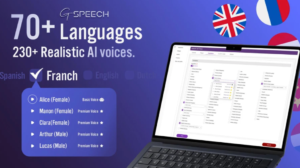
GSpeech isn’t limited to English.
The platform currently supports audio experiences in 98 languages, making it useful for multilingual websites and publishers with an international audience.
This is particularly useful if your website publishes content in multiple languages and you don’t want to maintain separate text-to-speech systems for each language.
-
300+ Voices
The commercial platform provides access to 300+ voices.
Depending on your selected language and plan, you can choose different voices and adjust how the narration sounds.
For publishers, having multiple voice options is useful because the same voice doesn’t necessarily work well for every type of content.
A technology blog, news website, educational site, and storytelling website can all benefit from different narration styles.
-
Voice Vibes
One interesting feature is Voice Vibes.
GSpeech offers more than 100 expressive voice styles, including options such as warm, confident, calm, emotional, whisper and narrator-style directions.
This makes the system more flexible than basic text-to-speech tools.
Instead of simply choosing a male or female voice, you can aim for a particular speaking style.
-
Voice Tuning
GSpeech also allows voice tuning.
Users can adjust:
- Speaking speed
- Pitch
- Voice style
- Pronunciation
- Voice instructions
The platform currently supports pitch adjustment of up to ±20 semitones and speed adjustment of up to 4× faster or slower.
These controls are useful when the default narration doesn’t quite match your content.
-
Pronunciation Aliases
Names, brands, abbreviations and technical terms can sometimes be pronounced incorrectly by AI voices.
GSpeech addresses this with Smart Pronunciation Aliases.
You can create a pronunciation replacement without changing the actual text displayed on your website.
For example, you could tell GSpeech how a particular brand name or abbreviation should be spoken while leaving the original written version untouched.
For professional websites, this is a surprisingly useful feature.
-
Read Highlighted Text
GSpeech also has a feature for listening to selected text.
Visitors can highlight a section of content and have it read aloud.
This is useful when someone doesn’t want to listen to an entire article but wants to hear a particular paragraph or section.
The company says its Read Highlighted Text feature evolved from its earlier “Listen to Selected Text” functionality.
-
WooCommerce Support
GSpeech isn’t restricted to blog posts.
It can also work with WooCommerce product descriptions, allowing online shoppers to listen to product information.
This could be particularly useful for accessibility-focused ecommerce stores or websites with long product descriptions.
-
Audio Translation
Commercial plans also support real-time audio translation across supported languages.
This can help websites create multilingual audio experiences without manually recording separate versions of every article.
For international publishers, this is one of GSpeech’s stronger features.
-
Audio Download
GSpeech can also provide an option for visitors to download generated audio as an MP3 file.
This is useful when your audience wants to listen later rather than keeping the webpage open.
GSpeech Pricing 2026 Visit affihub.io
| License Tier | Price | Websites | Non-AI Credits/Month | AI Credits/Month | Languages |
| Tier 1 | $69 | 1 | 500,000 | 0 | 65 |
| Tier 2 | $159 | 3 | 900,000 | 100,000 | 70 |
| Tier 3 | $339 | 5 | 1,000,000 | 1,000,000 | 70 |
| Tier 4 | $809 | 10 | 5,000,000 | 2,000,000 | 70 |
GSpeech vs Traditional WordPress TTS Plugins
One of the biggest differences is how GSpeech handles voice generation.
Some WordPress text-to-speech plugins rely heavily on browser speech synthesis or require users to connect their own API keys.
GSpeech instead provides a managed cloud platform.
That means:
- No separate Google TTS billing
- No OpenAI API key to configure
- No Gemini project to maintain
- Cloud audio generation
- Cloud storage
- Audio caching
- Centralized management
GSpeech says its commercial plans include the required API access within the GSpeech subscription.
For non-technical website owners, this can make setup much easier.
GSpeech for Accessibility
Accessibility is another major reason to consider GSpeech.
Giving visitors the ability to listen to an article can help people who have difficulty reading large amounts of text or simply prefer audio.
It can also make content more convenient for people who are multitasking.
GSpeech specifically positions its text-to-speech functionality as a way to help websites support accessibility and WCAG-related goals.
Of course, adding text-to-speech doesn’t automatically make a website fully WCAG compliant. Accessibility involves many other factors.
Still, an audio option can be a useful part of a broader accessibility strategy.
GSpeech User Reviews
The public feedback is generally positive.
WordPress.org currently shows GSpeech with a 4.8/5 average rating, based on more than 170 reviews.
Recent reviewers frequently mention the natural voice quality, straightforward installation and responsive support.
For example, a June 2026 reviewer described the plugin as easy to install and praised the AI voices compared with older “tinny” computerized voices.
There are also positive comments about support. A recent August 2026 review praised the plugin’s installation, audio quality and customer service.
However, the feedback isn’t universally positive.
One June 2026 reviewer complained about reaching an audio limit and said the lack of an unlimited paid tier was a problem for their website.
There was also a recent complaint about support response time, showing that customer experiences can vary.
So while the overall rating is strong, I wouldn’t ignore the usage limits when choosing a plan.
GSpeech Review 2026
Pros and Cons
| Pros |
Cons |
| 98 supported languages | Monthly character limits |
| 300+ voices | Higher plans can become expensive |
| Natural AI voices | Heavy publishers may need Pro or higher |
| No external API keys required | Some advanced features require paid plans |
| WordPress integration | Free usage is limited on GSpeech 3.x |
| WooCommerce support | Not ideal for every small website |
| Cloud audio generation | Pricing is subscription-based |
| Audio caching | Voice quality can vary by language |
| Voice customization | — |
| Audio translation | — |
Who Is GSpeech Best For?
Bloggers
If you publish long-form articles regularly, GSpeech can turn your posts into audio content without requiring you to record everything yourself.
News Websites
News publishers can benefit from giving readers another way to consume articles.
Educational Websites
Tutorials, guides and educational content can work particularly well in audio format.
Ecommerce Stores
WooCommerce stores can use text-to-speech for product descriptions and accessibility.
Multilingual Websites
With support for 98 languages, GSpeech is especially interesting for publishers serving international audiences.
Accessibility-Focused Websites
If accessibility and alternative content consumption are priorities, adding audio can be a worthwhile improvement.
Who Should Avoid GSpeech?
GSpeech isn’t necessarily the best choice for everyone.
If you only have a small website with a few short pages, paying for a dedicated TTS platform may be unnecessary.
Likewise, if you already have your own TTS infrastructure or prefer managing Google, OpenAI or another provider directly, GSpeech’s managed approach may not offer enough additional value.
And if your website generates huge amounts of audio every month, you should carefully calculate your character requirements before subscribing.
Is GSpeech Easy to Use?
For WordPress users, this is one of GSpeech’s strengths.
The plugin is designed to work with common WordPress websites and builders, and the company says it supports most themes and builders, including Divi.
The cloud-based architecture also means that voice generation isn’t performed directly on your WordPress server.
For someone who doesn’t want to deal with APIs and technical configuration, that makes GSpeech much more approachable.
GSpeech Review 2026: My Verdict
After looking at its current features, pricing and user feedback, GSpeech is a strong choice for WordPress websites that want to add professional text-to-speech without building their own audio system.
Its biggest strengths are the natural AI voices, 98-language support, 300+ voices, cloud processing, pronunciation controls and the fact that commercial users don’t need to manage separate API keys.
The pricing is reasonable for smaller publishers on the Personal plan, but larger websites need to pay close attention to character allowances.
I also like the fact that generated audio is cached and can be replayed without repeatedly generating the same content.
The main drawback is the usage-based character limits. If your website has a large archive and high traffic, you’ll need to estimate your monthly requirements before choosing a plan.
Overall, I would recommend GSpeech to bloggers, publishers, ecommerce owners and multilingual WordPress websites that want to make their content easier to consume through audio.
Final Rating: 4.6/5
Best for: WordPress bloggers, publishers, multilingual websites, ecommerce stores and accessibility-focused websites.
Bottom line: If you want to add AI-powered audio narration to your website without dealing with multiple TTS APIs, GSpeech is definitely worth considering in 2026.
GSpeech Review 2026
FAQs
Is GSpeech free?
GSpeech offers a free option. GSpeech 3.x currently includes 50,000 characters per month, while previously generated audio remains available for playback.
Does GSpeech work with WordPress?
Yes. GSpeech has a dedicated WordPress plugin that can add text-to-speech functionality to posts, pages and WooCommerce product descriptions.
How many languages does GSpeech support?
GSpeech currently supports 98 languages.
Does GSpeech require an API key?
Commercial GSpeech plans don’t require you to separately configure Google Cloud, OpenAI or Gemini API keys. The required voice services are managed through GSpeech.
Is GSpeech good for accessibility?
It can help improve content accessibility by giving visitors an audio alternative to reading. However, text-to-speech alone does not make a website fully accessible or automatically WCAG compliant.
Does GSpeech support WooCommerce?
Yes. GSpeech can convert WooCommerce product descriptions into audio.
How much does GSpeech cost in 2026?
The current annual plans start at $99.90 for Personal and go up to $1,299.90 for Enterprise.
Is GSpeech worth it?
For publishers who want natural AI narration, multilingual support and simple WordPress integration without managing separate TTS APIs, GSpeech is worth considering. The main thing to check is whether the plan’s monthly character allowance matches your publishing volume.
You have not enough Humanizer words left. Upgrade your Surfer plan.