Overview
In this FileBird Review 2026, we explore why this plugin has become a go-to solution for WordPress users who want a cleaner, faster, and more organized media library.
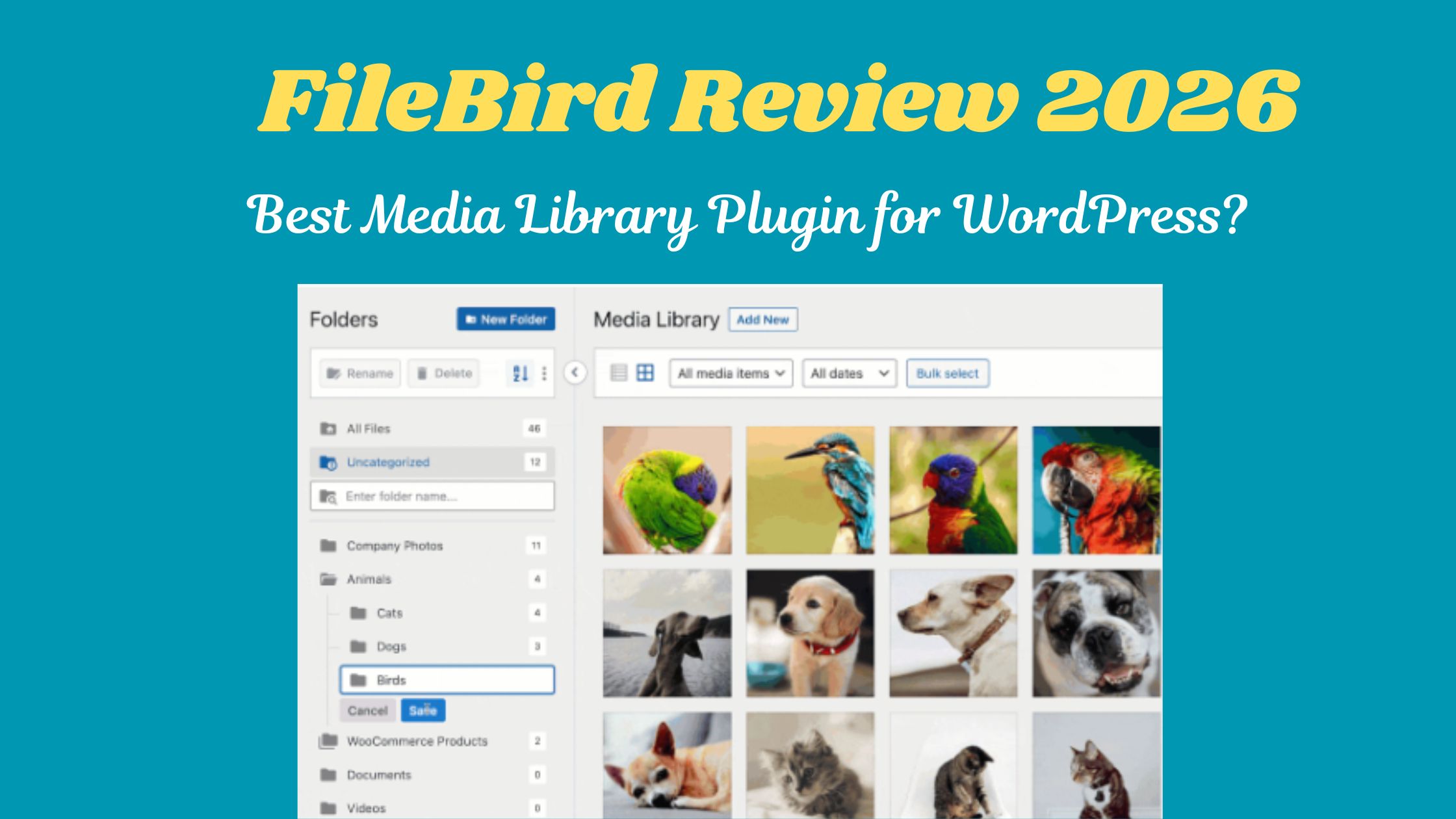
FileBird is a powerful WordPress plugin that lets you organize your images, videos, and documents into a structured folder system—just like your desktop. Instead of endlessly scrolling through a messy media library, you can quickly sort, search, and manage files with an intuitive drag-and-drop interface.
What makes this FileBird Review 2026 especially compelling is how well it handles large media libraries. Whether you’re managing a blog, business site, or eCommerce store, FileBird helps you save time, reduce clutter, and boost productivity without affecting your file URLs.
What is FileBird?
FileBird is a powerful WordPress media library plugin that helps you organize your files into folders, making it easier to manage images, videos, and documents inside your website.
As highlighted in this FileBird Review 2026, the plugin stands out for its simplicity and efficiency—especially for websites with large media libraries.
Unlike the default WordPress media library—which can quickly become cluttered—FileBird allows you to create a structured folder system, just like you have on your computer. This makes finding and managing media files faster, more efficient, and far less frustrating, particularly for growing websites.
With its drag-and-drop interface and virtual folder system, FileBird ensures your files stay organized without affecting your site’s URLs or performance.
FileBird is Ideal For:
Bloggers & Content Creators
Easily manage hundreds of images and media files without wasting time searching.
eCommerce Store Owners
Keep product images, categories, and assets neatly organized for quicker updates.
Web Developers & Designers
Handle large client projects with structured media folders and better workflow control.
Agencies Managing Multiple Sites
Maintain consistency and organization across different websites efficiently.
Website Owners with Large Media Libraries
Perfect for anyone dealing with 500+ files who needs speed and clarity.
Key Functions of FileBird

Category |
Feature |
Description |
| Organization | Virtual Folders | Create unlimited folders and subfolders to categorize media. Since they are “virtual,” moving files won’t break your live website links. |
| Drag & Drop | Move files into folders or rearrange the folder hierarchy using an intuitive drag-and-drop interface. | |
| Folder Themes | (Pro) Choose between different visual styles for your folders, such as Windows 11, Dropbox, or classic grey. | |
| Workflow | Smart Context Menu | Right-click any folder to quickly rename, create subfolders, set colours, or delete (similar to a desktop OS). |
| Upload to Folder | Select a specific folder from a dropdown menu while uploading new media to keep them organized from the start. | |
| Smart Startup | (Pro) Configure the plugin to open your last-used folder or a specific “home” folder every time you open the library. | |
| Navigation | Powerful Search | Search for both file names and folder names directly within the media library and page editors. |
| Advanced Sorting | (Pro) Sort files by size, date, name, or author. You can also sort folders alphabetically or by custom order. | |
| Folder Colours | (Pro) Assign specific colours to folders for quick visual identification (e.g., green for “Icons,” blue for “Banners”). | |
| Integration | Gutenberg Block | Insert a “FileBird Gallery” block that automatically displays all images from a specific folder on your front end. |
| Third-Party Support | Seamlessly works with Elementor, Divi, WPBakery, WooCommerce, and most major page builders. | |
| Migration Tool | One-click import to sync folder structures from other plugins like Real Media Library or HappyFiles. | |
| Management | Bulk Delete | Select and delete multiple folders at once while keeping the contained files safe in the “Uncategorized” section. |
| User-Based Views | (Pro) Allow different users/administrators to create and manage their own private folder structures. | |
| ZIP Export | (Pro) Download an entire media folder (including its subfolders) as a single ZIP file for backup or local use. |
Plan & Pricing of FileBird
Category |
Option |
Paraphrased Description |
Price |
| Standard Usage | Regular License | Grants permission for a single project (used by you or one client). The final product must be free for the public to access or use. | $49 |
| Commercial Usage | Extended License | Required if you are building a single product that users must pay to access or use (e.g., a paid subscription site or a “SaaS” model). | $299 |
| Included Services | Standard Package | Every purchase includes a verified quality check, all future software updates for the life of the product, and 6 months of technical help. | Included |
| Support Add-on | Extended Support | Increases your technical assistance window from 6 months to a full 12 months. | $16.50 (Special Price) |
| Support Renewal | Standard Extension | The typical cost to add or renew 6 months of support if not purchased during the initial promotional period. | $38.50 |
How FileBird Works?
Here’s a simple breakdown:
Creates Virtual Folders
FileBird doesn’t move files physically. Instead, it creates virtual folders inside the WordPress dashboard.
👉 This means your file URLs stay the same, and nothing breaks on your website.
Drag & Drop Organization
You can simply drag and drop images, videos, or documents into folders—just like you would on your computer.
Quick Access & Filtering
When you click on a folder, FileBird only shows files inside that folder.
👉 This makes it much faster to find what you need, especially on large websites.
Works Inside the Media Library
FileBird integrates directly into the default WordPress media library, so you don’t need to learn a new system.
Real-Time Updates
Any changes you make (moving files, creating folders) are instantly reflected without affecting your site’s performance.
Benefits of FileBird
Benefit |
Why it Matters in 2026 |
| ⚡ Instant Retrieval | With search engines rewarding fast content updates, finding your brand assets in 2 seconds instead of 2 minutes directly impacts your output speed. |
| 📁 Logical Hierarchy | You can create deep subfolders (e.g., Products > Electronics > 2026 > Q1) which is essential for e-commerce and high-traffic blogs. |
| 🚀 Productivity Gains | FileBird integrates into the “Add Media” popup in editors like Elementor, Divi, and Gutenberg, so you never have to leave your page-building workflow. |
| 🔍 Smart Searching | The search tool indexes both file names and folder names, providing a global search experience similar to a desktop OS. |
| 🔒 Virtual Security | Since the folders are “virtual,” your server’s physical file structure stays standard. This ensures 100% compatibility with backup plugins and SEO tools. |
| 📊 Scalability | Large sites with 5,000+ images can become laggy; FileBird uses optimized database queries to keep the library responsive even as your site grows. |
| 🧩 Total Compatibility | It works with WooCommerce, WPML (multilingual), and almost all major themes, making it a “set it and forget it” tool. |
FileBird Pros & Cons (2026)
Pros |
Cons |
| User-Friendly Interface: One of the most intuitive layouts, mimicking a standard desktop file explorer (Windows/Mac) within WordPress. | Free Version Limits: The Lite version is strictly limited to 10 folders, which can be quickly exhausted on medium-sized sites. |
| Non-Destructive Organization: Uses a “virtual” folder system. Moving files won’t break your live website links or affect SEO. | Database Dependency: Since organization is virtual, if you deactivate the plugin, your files will appear as one big “messy” list again. |
| High Performance: Lightweight code ensures it doesn’t slow down your WordPress admin dashboard, even with thousands of images. | No Physical Folder Sync: It does not create actual folders on your server (FTP/Cpanel). If you need server-side organization, this isn’t for you. |
| Broad Compatibility: Works seamlessly with Elementor, Divi, Gutenberg, and WooCommerce without any complex configuration. | Support Costs: Technical support is only included for the first 6 months; extending or renewing it requires additional fees. |
| Painless Migration: Easily imports folder structures from competitors like Real Media Library or HappyFiles. | Occasional Search Lag: On very resource-constrained hosting, the advanced search function can experience slight delays. |
Final Thoughts FileBird Review 2026
In this FileBird Review 2026, it’s clear that file manager plugins play an important role in helping you create, manage, and organize your website files and folders more efficiently in WordPress.
While WordPress already includes a default media library, it is quite limited in terms of advanced organization and usability. This is where media library and file manager plugins like FileBird come in, offering enhanced features that make file management easier, faster, and more structured.
As highlighted in this FileBird Review 2026, these plugins are designed to improve workflow, reduce clutter, and provide better control over your media files. Choosing the right tool can significantly boost productivity and simplify website management.
👉 Overall, this FileBird Review 2026 shows that FileBird stands out as a reliable solution for efficient WordPress media and file organization.
FAQ
❓Are these plugins safe to use?
Yes, file manager plugins are generally safe as long as you download them from the official WordPress plugin directory and keep them updated regularly. Many users have been using them for years without major issues.
❓ Can I break my website by using them?
There is a small risk if you delete important files by mistake. However, most plugins include safety features, and creating a backup before making changes helps avoid any serious problems.
❓ Do I need coding knowledge to use them?
No coding skills are required. Many tools, including WP File Manager, are designed to be user-friendly while still offering powerful features for beginners and advanced users.
❓ Can I install more than one file manager plugin?
It is not recommended. Using multiple file manager plugins at the same time can lead to conflicts, performance issues, and unexpected errors.
❓ What is the typical cost of these plugins?
Many file manager plugins are available for free. Premium versions usually cost around $25–$40 per year, depending on the features offered.
❓ Will they work with my WordPress theme?
Yes. File manager plugins operate within the WordPress dashboard, so they do not affect your theme’s design or frontend layout.
❓ Can I edit files directly in the browser?
Yes, most file manager plugins allow you to edit certain files directly inside the browser, making quick updates simple and convenient.